> For the complete documentation index, see [llms.txt](https://docs.neevcloud.com/llms.txt). Markdown versions of documentation pages are available by appending `.md` to page URLs; this page is available as [Markdown](https://docs.neevcloud.com/neevcloud-guide/neevcloud-remote-backup-and-dr/automated-disaster-recovery-dr-solution.md).
# Automated Disaster Recovery (DR) Solution
Ensuring Data Availability and Business Continuity Between Primary and DR Cloud Instances
**1. Objective**
The objective of this Disaster Recovery (DR) Drill is to validate the data synchronization process between the **Primary Cloud Instance** and the **DR Cloud Instance (Disaster Recovery Site)**.
This drill ensures:
* Data is replicated automatically
* Failover can be performed successfully
***
**2. Current Architecture & Environment Setup**
**2.1 Overview**
The Disaster Recovery (DR) solution is designed using two cloud instances:
* **Primary Cloud Instance** – Production environment where data is generated
* **DR Cloud Instance** – Disaster Recovery site where data is replicated
Data synchronization is performed using **Rsync over SSH**, and automation is achieved through **Cron jobs**.
***
**2.2 System Requirements**
* Two Linux-based Cloud Instances
* Root or sudo access on both instances
* Rsync installed on both instances
* SSH service enabled
***
**2.3 Network & Security Configuration**
* The DR Cloud Instance must be reachable from the Primary Cloud Instance
* SSH service must be open between both instances
* Secure communication is established using **SSH encryption**
* Password-less authentication is configured using **SSH key-based authentication**
{% hint style="info" %}
Data is transferred using Rsync over SSH, which provides end-to-end encryption. We also use SSH key-based authentication to ensure secure and password-less communication between the primary and DR instances.
{% endhint %}
***
**PHASE 1: PREREQUISITES AND INITIAL SETUP**
**Step 1.1: Verify and Install Rsync**
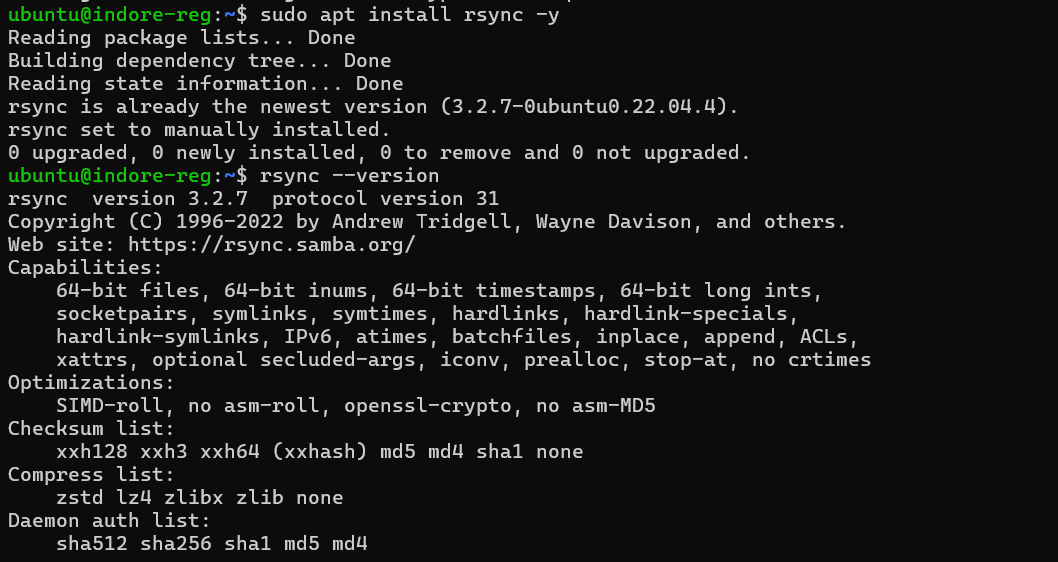
Before configuring the Disaster Recovery setup, it is important to ensure that **Rsync is installed on both the Primary and DR Cloud Instances**, as it is the core tool used for data synchronization.
The following commands are used to verify the operating system and check the availability of Rsync:
```
cat /etc/os-release
rsync --version
sudo apt-get update
sudo apt-get install rsync -y
```
* OS version (ubuntu 22.04)
* rsync version output
***
**PHASE 2: SSH KEY-BASED AUTHENTICATION**
This phase is used to configure **secure, password-less communication** between the Primary and DR Cloud Instances, which is required for automated Rsync operations.
**Step 2.1: Generate SSH Key on Primary Instance**
```
ssh-keygen -t rsa -b 4096
```
generateing a public-private SSH key pair on the Primary instance for secure authentication.
**Step 2.2: Copy SSH Key to DR Instance**
```
ssh-copy-id root@
```
This command copies the public key to the DR instance, enabling password-less SSH access.
**Step 2.3: Test Password-less Login**
```
ssh root@
exit
```
ssh login without password.
***
**PHASE 3: DATA DIRECTORY SETUP**
This phase involves creating the required data directory on both the **Primary and DR Cloud Instances** where the application data will be stored and synchronized.
**Step 3.1: Create Directory on Primary and DR instances both**
```
sudo mkdir -p /data/production
sudo chown -R $USER:$USER /data/production
chmod 755 /data/production
```
**Step 3.3: Create Test File**
```
echo "Initial data from Primary Site" > /data/production/file1.txt
date >> /data/production/file1.txt
```
creates a sample file to verify data synchronization between the Primary and DR instances.
***
**PHASE 4: MANUAL RSYNC TEST**
This phase validates that data can be successfully transferred from the **Primary Cloud Instance to the DR Cloud Instance** using the Rsync command before enabling automation.
**Step 4.1: Run Rsync**
```
rsync -avz --progress /data/production/ root@:/data/production/
```
**Verification**
```
ssh root@ 'ls -lh /data/production/'
ssh root@ 'cat /data/production/file1.txt'
```
* rsync output
* file present on DR
***
**PHASE 5: AUTOMATION SCRIPT**
This phase involves creating a shell script to automate the data synchronization process between the **Primary and DR Cloud Instances** using Rsync.
**Step 5.1: Create Script**
```
nano /home/ubuntu/sync_to_dr.sh
```
**Step 5.2: Script Content**
```
#!/bin/bash
SOURCE_DIR="/data/production/"
DEST_USER="root"
DEST_HOST="" # replace with DR IP
DEST_DIR="/data/production/"
LOG_FILE="/home/ubuntu/dr_sync.log"
TIMESTAMP=$(date "+%Y-%m-%d %H:%M:%S")
echo "[$TIMESTAMP] Starting sync..." >> $LOG_FILE
rsync -avz --delete \
--exclude='*.tmp' \
--exclude='*.log' \
$SOURCE_DIR \
$DEST_USER@$DEST_HOST:$DEST_DIR \
>> $LOG_FILE 2>&1
if [ $? -eq 0 ]; then
echo "[$TIMESTAMP] Sync completed successfully" >> $LOG_FILE
else
echo "[$TIMESTAMP] Sync failed" >> $LOG_FILE
fi
echo "-----------------------------------" >> $LOG_FILE
```
> The script automates data synchronization and logs all activities, enabling easy monitoring and troubleshooting.
\
**Step 5.3: Make Executable**
```
chmod +x /home/ubuntu/sync_to_dr.sh
```
**Step 5.4: Test Script**
```
/home/ubuntu/sync_to_dr.sh
cat /home/ubuntu/dr_sync.log
```
***
**PHASE 6: CRON JOB CONFIGURATION**
This phase involves configuring a cron job to automate the execution of the Rsync script at regular intervals, ensuring continuous data synchronization between the **Primary and DR Cloud Instances**.
**Step 6.1: Configure Cron**
```
crontab -e
```
Add:
```
*/2 * * * * $HOME/sync_to_dr.sh
```
{% hint style="info" %}
For production usage, the cron interval can be increased to 15 minutes (`*/15 * * * * /home/ubuntu/sync_to_dr.sh`) to balance system performance and data consistency.
{% endhint %}
**Step 6.2: Verify**
```
crontab -l # crontab entry
systemctl status cron # cron status
```
A cron job is scheduled every 2 minutes to automatically trigger the backup script and replicate data from the Primary (Indore) to the DR (Mumbai) instance.
***
**PHASE 7: FINAL DR DRILL TEST (AUTOMATED SYNC VALIDATION)**
**Objective**
To validate that the automated cron-based rsync synchronization is working correctly and data created on the Primary Cloud Instance (Indore) is successfully replicated to the DR Cloud Instance (Mumbai).
**Step 7.1: Check Current State on Primary Instance**
```
date
ls -lh /data/production/
```
This step verifies the current data available on the Primary instance before performing the DR drill.
**Step 7.2: Create DR Drill Test File on Primary Instance**
```
echo "========================================" > /data/production/DR-DRILL-FINAL-TEST.txt
echo "========================================" >> /data/production/DR-DRILL-FINAL-TEST.txt
echo "Created on: $(date)" >> /data/production/DR-DRILL-FINAL-TEST.txt
echo "Source: Indore (Primary)" >> /data/production/DR-DRILL-FINAL-TEST.txt
echo "Destination: Mumbai (DR Site)" >> /data/production/DR-DRILL-FINAL-TEST.txt
echo "Sync Method: Rsync via Cron (Every 2 min)" >> /data/production/DR-DRILL-FINAL-TEST.txt
echo "========================================" >> /data/production/DR-DRILL-FINAL-TEST.txt
```
This step creates a test file containing timestamp and DR drill information.
**Screenshot 8: DR Drill File Created on Primary**
**Step 7.3: Verify File is NOT Present on DR Instance (Before Sync)**
```
ssh root@154.221.35.117 'ls -lh /data/production/'
```
This ensures that the file is not yet replicated to the DR site before cron execution.
**Step 7.4: Wait for Cron Job Execution**
The cron job runs every 2 minutes as configured:
```
*/2 * * * * /home/ubuntu/sync_to_dr.sh
```
Wait for 2–3 minutes for automatic synchronization.
(Optional monitoring)
```
tail -f /home/ubuntu/dr_sync.log
```
***
**PHASE 8: FINAL DR DRILL TEST**
**Step 8.1: Check Current State**
```
date
ls -lh /data/production/
```
**Step 8.2: Verify File on DR Instance (After Sync)**
```
ssh root@154.221.35.117 'cat /data/production/DR-DRILL-FINAL-TEST.txt'
```
This confirms that the file has been successfully synchronized to the DR instance.
{% hint style="info" %}
The synchronization is fully automated using a cron job scheduled at a 2-minute interval. The DR drill confirms that newly created files on the Primary Cloud Instance are successfully replicated to the DR Cloud Instance without manual intervention
{% endhint %}
***
**PHASE 9: PRODUCTION CRON CONFIGURATION**
Change interval:
```
*/15 * * * * $HOME/sync_to_dr.sh
```
* updated crontab
***
**PHASE 10: DR FAILOVER TEST**
This phase validates that the **DR Cloud Instance can take over operations** in case of failure of the Primary Cloud Instance, ensuring business continuity.
**Step 10.1: Final Sync**
```
~/sync_to_dr.sh
```
**Step 10.2: Shutdown Primary**
```
sudo shutdown -h now
```
**Step 10.3: Activate DR**
```
ssh root@
ls -lh /data/production/
```
* DR data verification
* primary shutdown
> The Primary instance is intentionally shut down to simulate a failure scenario. After that, the DR instance is accessed to verify data availability, ensuring that the Disaster Recovery setup is functioning correctly and can support failover operations.